

TL;DR:
- Implementing a tiered, automated discount workflow helps small businesses control pricing and protect profit margins. It uses CRM systems, automation tools, and notifications to streamline approvals and logging. Strict governance, regular reviews, and integration with billing prevent margin leakage and foster better pricing decisions.
A small business discount workflow is an automated, tiered approval process that controls who can offer discounts, at what percentage, and under what conditions. Without one, discounts become reactive giveaways that quietly destroy margins. With one, every price reduction is tracked, justified, and approved by the right person. Tools like HubSpot, Salesforce, Zapier, and WooCommerce plugins make this process fast to build and easy to maintain. The payoff is real: faster deal closings, protected profit margins, and customer promotions that actually make business sense.
What are the essential tools to build a discount workflow?
A working discount management system for small business starts with three layers: a CRM, an automation connector, and a notification tool. Each layer handles a distinct job. Together, they replace the informal email chains and verbal approvals that cause margin leakage.
CRM systems form the backbone. HubSpot, Salesforce, and Pipedrive all support deal stages and custom approval fields. A Discount Authority Matrix embedded directly in your CRM automates discount routing and eliminates approval bottlenecks. That matrix defines exactly which role can approve which discount tier, so no one has to guess.

Automation middleware connects your CRM to everything else. Zapier, Make, and n8n are the three most widely used options for small businesses. They trigger approval requests, send notifications, and log outcomes without manual input. n8n is open source, which makes it attractive if you want to avoid monthly subscription costs.
Notification tools close the loop. Slack and email remain the standard channels for routing approval requests to the right manager. The goal is zero friction: the approver gets all deal details in one message and responds with one click.
Before you touch any software, two non-negotiable prerequisites apply:
- Define your discount authority matrix with specific percentage ceilings per role (sales rep, sales manager, VP of Sales, CFO).
- Get leadership sign-off on the policy before automation goes live. A VP of Sales or CFO who disagrees with the thresholds will bypass the system, which defeats the purpose.
- Set minimum margin thresholds for every product category. Automation cannot protect a margin it does not know exists.
- Document your pricing baselines so the system has a reference point for calculating true discount impact.
Pro Tip: Before building any automation, run a 30-day audit of every discount your team gave manually. The patterns you find will tell you exactly where to set your approval thresholds.
How to structure and automate your discount approval process
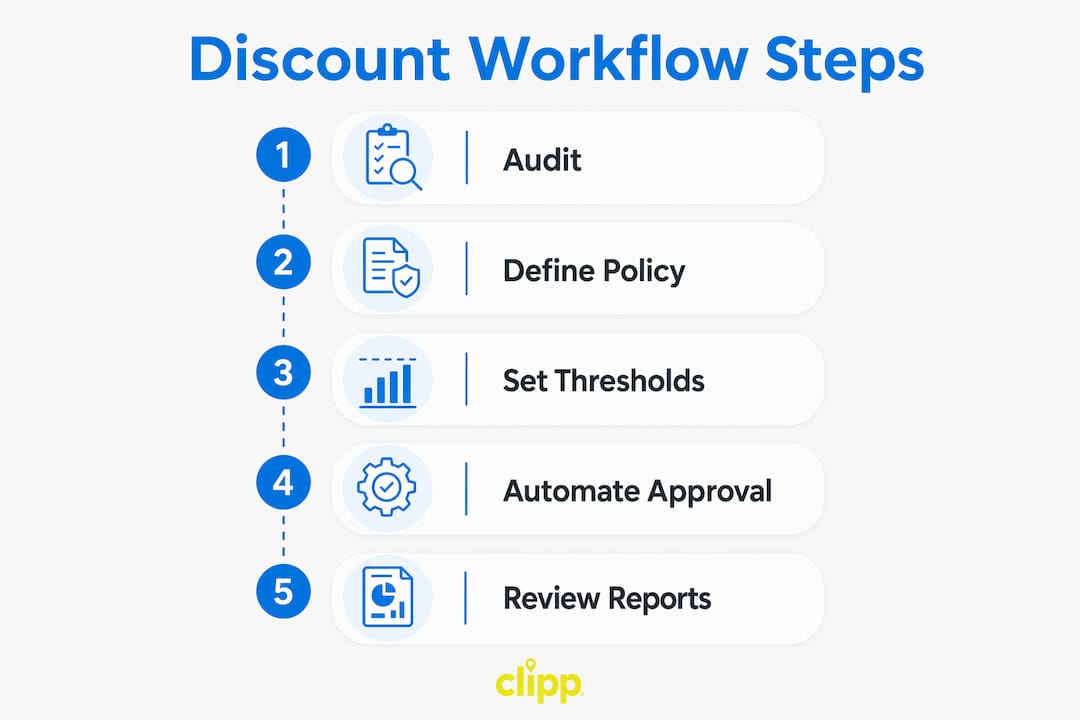
A well-built workflow follows five steps. Each step has a clear owner, a clear trigger, and a clear output.
-
Capture the request. Build a structured form inside your CRM or via a tool like Typeform or Google Forms. The form collects: rep name, customer name, deal value, requested discount percentage, and a written reason. No form submission means no discount consideration. This single rule eliminates casual, undocumented requests.
-
Apply tiered routing logic. Tiered discount approval workflows use percentage-based limits to balance speed and control. A standard structure looks like this:
| Discount Range | Approver | Typical Response Time |
|---|---|---|
| 0–5% | Auto-approved | Instant |
| 5–15% | Sales manager | Same day |
| 15–25% | VP of Sales | 24 hours |
| 25%+ | CFO | 48 hours |
This structure keeps small discounts moving fast while protecting the deals that carry real margin risk.
-
Send a contextual approval request. The automation (Zapier, Make, or n8n) pulls all deal data from the CRM and sends it to the designated approver via Slack or email. The approver sees the customer name, deal size, requested discount, and the rep's written justification in a single message. They approve or reject with one response. No back-and-forth, no missing context.
-
Log every decision automatically. CRM-embedded approval workflows record approvals, rejections, timestamps, and approver names without manual data entry. That log becomes your audit trail. It also feeds your analytics.
-
Generate weekly reports. Set your automation to compile a weekly summary: total discounts approved, average discount percentage, most common rejection reasons, and total margin impact. This report is the most underused output of any discount workflow. It tells you whether your pricing policy is working or drifting.
Pro Tip: Use Zapier's "Digest" feature or Make's scheduling module to auto-send your weekly discount report every monday morning. Managers who see the data weekly make better approval decisions than those who review it quarterly.
Salesforce's price management tools unify list prices, discount rules, and partner tiers into a single source of truth. That architecture prevents the most common small business problem: two reps offering different prices to the same customer.
What best practices keep a discount workflow healthy over time?
The biggest mistake small business owners make is treating discounts as a sales rescue tool. Discounting is best governed as a controlled commercial instrument, not a reactive tactic to close a slow month. That distinction changes everything about how you design and enforce your workflow.
"Without governance, frequent discounts erode brand equity and profit. Rules and oversight are essential." — Discount Strategy and Promotion Governance
Governance means written rules, not just intentions. The following practices keep your system from drifting:
- Require written justification for discounts above 10%. Documented justification for significant discounts, such as competitive intelligence or a strategic account reason, creates a data trail that refines your pricing strategy over time. A rep who cannot explain why a customer deserves 15% off probably should not offer it.
- Integrate your workflow with billing and POS systems. Failure to connect discount approvals with billing leads to margin leakage through mismatched invoices. Your workflow must auto-update invoices with approved discount details. WooCommerce plugins, for example, apply schedule-based and usage-limited discounts with full logging built in.
- Build a cash reserve before relying on discounts to drive volume. The median small business holds only 27 days of cash. Experts recommend a three-month reserve built by automatically saving 5–10% of revenue. A business with thin reserves is tempted to discount aggressively during slow periods, which compounds the cash problem.
- Run a quarterly policy review. Pull your weekly reports, look at average discount percentages by rep and by product, and adjust your thresholds accordingly. Policies that never change stop reflecting reality.
- Prevent discount stacking. Define clearly whether customers can combine promotions. Uncontrolled stacking is one of the fastest ways to turn a profitable sale into a loss.
You can read more about how discounts affect long-term margins before setting your thresholds. The governance principles there apply directly to workflow design.
How does automation reduce errors compared to manual discount approvals?
Manual discount approval is a friction machine. A rep sends a Slack message, waits for a reply, follows up by email, and sometimes just gives the discount without waiting. That process produces inconsistent decisions, no audit trail, and no data.
Automation fixes each of those problems at the source. Discount approvals embedded in CRMs reduce delays and errors by routing requests based on discount thresholds, deal stage, and deal size automatically. The right person gets the request. They respond. The system logs the outcome. No one has to chase anyone.
AI is accelerating this further. AI-augmented discount workflows validate requests against margin thresholds instantly, flagging only the top 10% of deals for human review. That means managers spend their time on complex, high-value negotiations rather than approving routine 5% discounts. The result is faster approvals across the board and better decisions on the deals that actually matter.
Real-time notifications are the other major gain. When an approver gets a Slack message with full deal context, they can respond in minutes rather than hours. That speed matters in competitive sales situations where a delayed approval means a lost deal. Pair that with accurate logging, and you have a system that is both fast and fully auditable.
For small businesses looking to boost sales with structured deals, automation removes the operational drag that makes promotions feel more trouble than they are worth.
Key Takeaways
A structured, automated discount workflow is the single most effective way for small businesses to protect margins while keeping sales moving fast.
| Point | Details |
|---|---|
| Build the policy first | Define your Discount Authority Matrix and get leadership sign-off before touching any automation tool. |
| Use tiered approval thresholds | Route discounts of 0–5% for auto-approval, 5–15% to a sales manager, and 25%+ to the CFO. |
| Integrate with billing and POS | Connect your workflow to invoicing systems to prevent margin leakage from mismatched records. |
| Require justification above 10% | Written reasons for larger discounts create a data trail that improves pricing decisions over time. |
| Review weekly reports | Weekly analytics on approved discounts and rejection reasons keep your pricing policy grounded in reality. |
Why most small business discount systems fail before they start
The most common failure I see is not a technology problem. It is a policy problem. Owners build a Zapier workflow, connect it to HubSpot, and then discover that their sales manager approves every request because there are no written rules about when to say no. The automation works perfectly. The governance does not exist.
Leadership buy-in is not optional. If the VP of Sales thinks the approval thresholds are too tight, they will tell reps to ask for less on paper and adjust the price later. That behavior destroys the audit trail and the margin protection simultaneously. The policy conversation has to happen before the first workflow trigger is built.
The second mistake is ignoring the data the workflow generates. Weekly discount reports are genuinely valuable. They show you which reps discount most frequently, which products attract the most price pressure, and whether your average discount is creeping upward over time. I have seen small businesses use that data to identify a product line that was consistently underpriced, which led to a price increase that improved margins without losing a single customer.
The third mistake is choosing automation platforms that cannot scale. A tool that works for 10 deals a month may collapse at 200. Zapier, Make, and n8n all handle growth well, but you need to build with volume in mind from the start. Flexible platforms cost the same to set up and save a painful migration later.
Balancing speed with control is the real skill. Fast approvals win deals. Controlled approvals protect the business. A well-designed workflow does both, and that is worth the upfront effort.
— Mehmet
How Clipp can support your discount strategy
Running promotions is only half the job. Getting those promotions in front of the right local customers is the other half. Clipp connects small businesses with deal-seeking consumers across dining, wellness, home services, and more. Whether you are running a limited-time offer or a seasonal campaign, Clipp's platform gives your discounts real reach without requiring a marketing team to manage them. Explore local savings deals to see how businesses in your area are using curated promotions to drive foot traffic. If you want to list your own offers, visit Clipp's advertising page to get started. State-specific offers are also available for businesses in Texas, Virginia, and Massachusetts.
FAQ
What is a small business discount workflow?
A small business discount workflow is an automated, tiered approval process that routes discount requests to the correct approver based on percentage thresholds. It replaces informal approvals with a logged, policy-driven system.
What tools do I need to automate discount approvals?
You need a CRM such as HubSpot, Salesforce, or Pipedrive, an automation connector such as Zapier or Make, and a notification channel such as Slack or email. Together, these three layers handle routing, approval, and logging automatically.
How do tiered discount thresholds work?
Discounts up to 5% are typically auto-approved, 5–15% require a sales manager, 15–25% require a VP, and anything above 25% goes to the CFO. These thresholds balance speed for small discounts with oversight for margin-sensitive decisions.
Why should discounts above 10% require written justification?
Written justification for larger discounts creates a data trail that reveals pricing patterns over time. That data helps owners refine thresholds, identify underpriced products, and make better long-term pricing decisions.
How does integrating discounts with billing prevent margin leakage?
When discount approvals automatically update invoices in your billing or POS system, the approved price matches what the customer is actually charged. Without that integration, mismatched invoices create untracked margin losses.